Showing posts with label EQE 2021. Show all posts

Friday, March 5, 2021

e-EQE - C 2021 (D/E): copy to try, last exam, few technical problems

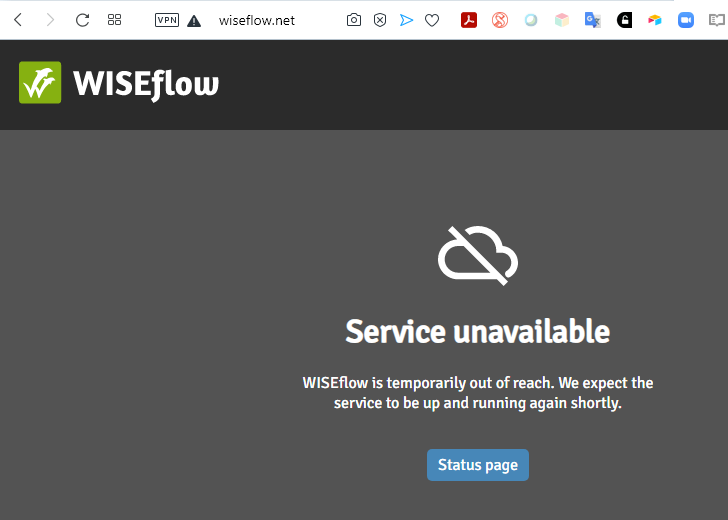
Updated 7 Mar 21 with status picture. Updated 6 Mar 21 with extra comments on C. Updated 5 Mar 21 with WISEflow unavailable picture :-)
Today was the e-EQE C Exam. I have extracted the claims of the patent as granted and added them to the printable files. I have also put the claims at the end of each part to simulate exam conditions - DE version, EN version (sorry no FR), The official compendium versions will be available next week.

  • I have not made it yet, but check the Telegram groups for some discussions and comments. Today there were not a lot of discussions - most seem to be happy to have survived the first eEQE, and to start the weekend early. Some discussion about the length and complexity. See below for some comments on the problems.
  • No widespread technical issues πŸ‘πŸ‘πŸ‘

1. Thanks to the EQE organisation, and good luck with the marking
  • Thanks to all the invigilators, helpdesk staff, EQE secretariat members, and epi/EPO members who have been working tirelessly for the last few months to make it happen. Even under pretty stressful conditions (on both sides), the majority of candidates said that they felt listened to and helped πŸ‘πŸ‘πŸ‘. 
    • it seems that the general experience during the C exam that everything was running smoothly πŸ’ͺ.
  • And good luck to those involved in the marking - at least you will not have to struggle with poor handwriting any more πŸ˜‰, although there are a lot of spelling mistakes and copy/paste errors to puzzle over.

2. My suggestions to candidates after the eEQE
  • You survived the historic first eEQE πŸ₯‡
  • Put your TAB and WINKEY caps back πŸ˜€
  • Manually uninstall Lockdown Browser: in Win10, it is found in the start menu under Respondus
    • be suspicious of any emails mentioning WISEflow or Lockdown Browser
    • if you get any emails about "updates" of the Lockdown Browser, do not click on them
  • ... actual screenshot of WISEflow (5 Mar 21 2330) - EQE candidates got their revenge πŸ’£πŸ’£πŸ’£πŸ’£, or at least "broke" WISEflow
  • ... and the status page on Friday indicated that the last major incident was 3 days ago (Tues was also the "D1 incident")
  • Preferably unplug all the extra cameras and microphones. Or at least cover the cameras when not in use.
  • Take a couple of days off and celebrate as much as you can respecting your local lockdown rules πŸ˜‰
  • Don't read blog posts about model answers. They are usually made by EQE nerds who made the exams under relaxed conditions. They could still be wrong. Even if it is a perfect answer, no-one knows where all the marks will be awarded. 
  • The marking sheets are only finalised after the exam following discussions within the committees about what to accept and what not. For example, if there was an issue almost no-one dealt with, they usually compensate by awarding marks for something else that most people got. The exams also have built-in fail-safes, so if you miss something, you will not lose marks everywhere. 

3. Telegram chat groups

  • The main group has 285 members, for general issues and WISEflow + LockDown Browser + Zendesk issues. The (ABC+PE claims analysis) group has 159 members, the (D+PE legal) group has 131 members, and the summer study group for EQE 2022 preparation already has 81 members. Now also a EQE Marketplace if you want to sell or buy EQE materials.
    • Started for students to discuss with others, but completely open to any tutors from any organisation who want to just read or join the discussions. 
    • If you have just done an exam, only discuss the answers if you can really take it. For most people, it is better not to discuss - you can't change your answer, no-one knows what the marking will be for particular answers (Main Exam) and sometimes more than one Pre-Exam answer is accepted. 
    • Group rules: no discussions of ways to cheat, no exchanges of large sections of copyrighted materials (excerpts, annotated examples, WIPO/EPO docs etc. are allowed), no requesting or sharing of exam materials until after the scheduled end of the last part of that exam, no requesting or sharing of invigilator password.

4. WISEflow, before the exam, after the exam
  • At least one person noticed that the pdf of their D1-Part 1 and D2 answers was missing statements and even had a blank page. It is not clear how widespread it is, but it is advisable to check (while you remember) whether it is complete after the exam.
    • I have not seen any messages about problems after the A, B or C Exams
  • The copy of the answer from Part 1 was available very quickly in WISEflow πŸ‘. 

5. LockDown Browser

  • No widespread technical issues πŸ‘πŸ‘πŸ‘
  • Wednesday, after the widespread problems D1-Part 1, the Examination Board issued a very clear unambiguous commitment to ease candidates minds:
  • On the official e-EQE page, a message from Examination Board (3 Mar 21):
    • The Examination Board of the EQE is aware of a situation that affected paper D1.1. The Examination Board guarantees that the marking process will be conducted so that no candidate will be disadvantaged because of that.πŸ‘πŸ‘πŸ‘
  • Problems seen when handing-in answers at the end of D2 (quoted from Telegram chat)
    • No problems reported for C-1 and C-2.
  • Copy/paste from the C Exam did not retain the formatting at all, and CTRL-SHIFT-V or the remove formatting button removed line breaks and a lot of spaces between words.
    • copy/paste is a major advantage of an online exam. It is disappointing that this cannot be made to function properly

    6. Reporting complaints & problems to helpdesk@eqe.org
    • See here for post about Instructions to Candidates
      • ItC 11- email complaints regarding conduct as soon as possible, but no later than end of day of the exam. ItC 39 - email report on any disruptions during exam for which candidates are not responsible or which are beyond their control within 24 hrs of end of exam.
    • The EQE organisation is well aware of many issues, and general issues affecting large numbers of people will be taken into account during the marking. However, they may not be aware how a disruption or incident has affected an individual candidates performance. The idea of reporting is to give them a chance to consider whether to take it into account during the marking. They may also not realise how a positive thing for many (30 mins extension) could have a negative effect on an individual.
    • As an emails need to be sent very quickly, and most candidates are pretty tired after the exam, I worked with Preston Richard (Bardehle Pagenberg) to make a complaint template with some of the possible things you may wish to mention (we collected them from the blogs and chats). It may also reduce the number of emails from each candidate.
      • But don't just copy everything and send it - it must be personalised to explain your situation and experiences.
    CLICK BELOW FOR COMMENTS ON C (no spoilers) 

    e-EQE - B 2021 (D/E/F): copy to try yourself, very long exam, few technical problems

    😱Update 6 Mar 21: note added on formatting.
     Yesterday was the e-EQE B Exam. Sorry for the delay, but I was waiting for the compendium version. They are being put online the day after the exam πŸ‘. It is difficult to extract 13 non-printable pages, and there were complaints about the formatting, so I wanted to check. I have slightly amended them by putting the online only pages at the end to simulate exam conditions - DE version, EN version, FR version. 

    • I was dreading this exam as it was the worst to do online due to the large amount of unprintable pages, and the frequent need to compare parts of the exam. 
    • I have not made it yet, but check the Telegram groups for some discussions and comments. There were certainly a lot of discussion about the length and complexity yesterday. See below for some comments on the problems.
    • For any one who struggled and feels desperate, remember that the final marking (what is required, accepted, what is not accepted and any deductions) still has to be finalised. They fine tune everything based on how the paper was made by a large number of candidates. 
    • Answers posted on blogs are often made by 2-3 nerds who spend several hours doing it, and usually represents a theoretical answer. But it could be wrong, the number of marks to be awarded is unknown, and other solutions could be accepted.
    • No widespread technical issues πŸ‘πŸ‘πŸ‘

    1. Telegram chat groups

    • The main group has 284 members, for general issues and WISEflow + LockDown Browser + Zendesk issues. The (ABC+PE claims analysis) group has 154 members, the (D+PE legal) group has 130 members, and the summer study group for EQE 2022 preparation already has 79 members. Now also a EQE Marketplace if you want to sell or buy EQE materials.
      • Started for students to discuss with others, but completely open to any tutors from any organisation who want to just read or join the discussions. 
      • If you have just done an exam, only discuss the answers if you can really take it. For most people, it is better not to discuss - you can't change your answer, no-one knows what the marking will be for particular answers (Main Exam) and sometimes more than one Pre-Exam answer is accepted. 
      • Group rules: no discussions of ways to cheat, no exchanges of large sections of copyrighted materials (excerpts, annotated examples, WIPO/EPO docs etc. are allowed), no requesting or sharing of exam materials until after the scheduled end of the last part of that exam, no requesting or sharing of invigilator password.

    2. WISEflow, before the exam, after the exam
    • Some problems accessing exams for printing before the exam (the links do not appear), so some candidates could only read the pages online during the exam
      • Helpdesk answer: ".. participant’s computer has changed its external IP addresses from when they last refreshed the page in WISEflow (flow overview)". Refreshing only the flow page (where the download links are visible) is not enough.
      • Solution (1) from helpdesk: Reload (Refresh in browser or CTRL F5) of flow overview page in WISEflow
      • Solution (2) from participant (if (1) does not work): logout and back in to WISEflow
    • At least one person noticed that the pdf of their D1-Part 1 and D2 answers was missing statements and even had a blank page. It is not clear how widespread it is, but it is advisable to check (while you remember) whether it is complete after the exam.
      • I have not seen any messages about problems after the A or B Exams

    3. LockDown Browser

    • No widespread technical issues πŸ‘πŸ‘πŸ‘
    • A lot of individual issues with the Browser crashing. In spite of sometimes losing up to 20 mins, and requesting extra time, a number of people reported that the request was denied.
    • Wednesday, after the widespread problems D1-Part 1, the Examination Board issued a very clear unambiguous commitment to ease candidates minds:
    • On the official e-EQE page, a message from Examination Board (3 Mar 21):
      • The Examination Board of the EQE is aware of a situation that affected paper D1.1. The Examination Board guarantees that the marking process will be conducted so that no candidate will be disadvantaged because of that.πŸ‘πŸ‘πŸ‘
    • Problems seen when handing-in answers at the end of D2 (quoted from Telegram chat)
      • Could not submit because of "connection error". System message gets you nowhere as everything is greyed out. 
      • Told by Zendesk to refresh. They said it's a common issue. System overload as everyone submits at the same time (and the D-2 has a larger data volume). 
      • Also seen when handing-in A and B. So expected for C-1 and C-2.

      4. Reporting complaints & problems to helpdesk@eqe.org
      • See here for post about Instructions to Candidates
        • ItC 11- email complaints regarding conduct as soon as possible, but no later than end of day of the exam. ItC 39 - email report on any disruptions during exam for which candidates are not responsible or which are beyond their control within 24 hrs of end of exam.
      • The EQE organisation is well aware of many issues, and general issues affecting large numbers of people will be taken into account during the marking. However, they may not be aware how a disruption or incident has affected an individual candidates performance. The idea of reporting is to give them a chance to consider whether to take it into account during the marking. They may also not realise how a positive thing for many (30 mins extension) could have a negative effect on an individual.
      • As an emails need to be sent very quickly, and most candidates are pretty tired after the exam, I worked with Preston Richard (Bardehle Pagenberg) to make a complaint template with some of the possible things you may wish to mention (we collected them from the blogs and chats). It may also reduce the number of emails from each candidate.
        • But don't just copy everything and send it - it must be personalised to explain your situation and experiences.
      CLICK BELOW FOR MORE DETAILS ABOUT B (mild spoilers)

      Thursday, March 4, 2021

      e-EQE - A 2021 (EN & DE): copy to try yourself, few technical problems

      Yesterday was the e-EQE A Exam. If you want to try yourself, see here for complete copies with first the printable parts and the online only parts. The online parts have been extracted from answers, so they may not be perfect. The font is also quite small (would normally be 7 pages). A 2021 - complete (EN) and A 2021 - complete (DE). Sorry, I had no French answer to work with. The EPO normally makes official copies available in the compendium in the week after the EQE. 

      • I have not made the paper yet, but check the Telegram groups for some discussions and comments. There were certainly a lot of discussion about different answers yesterday.
      • No widespread technical issues πŸ‘πŸ‘πŸ‘

      1. Telegram chat groups

      • The main group has 265 members, for general issues and WISEflow + LockDown Browser + Zendesk issues. The (ABC+PE claims analysis) group has 135 members, the (D+PE legal) group has 124 members, and the summer study group for EQE 2022 preparation already has 71 members. Now also a EQE Marketplace if you want to sell or buy EQE materials.
        • Started for students to discuss with others, but completely open to any tutors from any organisation who want to just read or join the discussions. 
        • If you have just done an exam, only discuss the answers if you can really take it. For most people, it is better not to discuss - you can't change your answer, no-one knows what the marking will be for particular answers (Main Exam) and sometimes more than one Pre-Exam answer is accepted. 
        • Group rules: no discussions of ways to cheat, no exchanges of large sections of copyrighted materials (excerpts, annotated examples, WIPO/EPO docs etc. are allowed), no requesting or sharing of exam materials until after the scheduled end of the last part of that exam, no requesting or sharing of invigilator password.

      2. WISEflow, before the exam, after the exam
      • Some problems accessing papers for printing before the exam (the links do not appear), so some candidates could only read the pages online during the exam
        • Helpdesk answer: ".. participant’s computer has changed its external IP addresses from when they last refreshed the page in WISEflow (flow overview)". Refreshing only the flow page (where the download links are visible) is not enough.
        • Solution (1) from helpdesk: Reload (Refresh in browser or CTRL F5) of flow overview page in WISEflow
        • Solution (2) from participant (if (1) does not work): logout and back in to WISEflow
      • At least one person noticed that the pdf of their D1-Part 1 and D2 answers was missing statements and even had a blank page. It is not clear how widespread it is, but it is advisable to check (while you remember) whether it is complete after the exam.
        • I have not seen any messages about problems after the A Exam

      3. LockDown Browser (many comments posted under PE 2021 post and in Telegram chats)

      • No widespread technical issues πŸ‘πŸ‘πŸ‘
      • Yesterday, after the widespread problems D1-Part 1, the Examination Board issued a very clear unambiguous commitment to ease candidates minds:
      • On the official e-EQE page, a message from Examination Board (3 Mar 21):
        • The Examination Board of the EQE is aware of a situation that affected paper D1.1. The Examination Board guarantees that the marking process will be conducted so that no candidate will be disadvantaged because of that.πŸ‘πŸ‘πŸ‘
      • Problems seen when handing-in answers at the end of D2 (quoted from Telegram chat)
        • Could not submit because of "connection error". System message gets you nowhere as everything is greyed out. 
        • Told by Zendesk to refresh. They said it's a common issue. System overload as everyone submits at the same time (and the D-2 has a larger data volume). 
        • So be aware of this for A,B, C-1 and C-2

        4. Reporting complaints & problems to helpdesk@eqe.org
        • See here for post about Instructions to Candidates
          • ItC 11- email complaints regarding conduct as soon as possible, but no later than end of day of the exam. ItC 39 - email report on any disruptions during exam for which candidates are not responsible or which are beyond their control within 24 hrs of end of exam.
        • The EQE organisation is well aware of many issues, and general issues affecting large numbers of people will be taken into account during the marking. However, they may not be aware how a disruption or incident has affected an individual candidates performance. The idea of reporting is to give them a chance to consider whether to take it into account during the marking. They may also not realise how a positive thing for many (30 mins extension) could have a negative effect on an individual.
        • As an emails need to be sent very quickly, and most candidates are pretty tired after the exam, I worked with Preston Richard (Bardehle Pagenberg) to make a complaint template with some of the possible things you may wish to mention (we collected them from the blogs and chats). It may also reduce the number of emails from each candidate.
          • But don't just copy everything and send it - it must be personalised to explain your situation and experiences.

        Wednesday, March 3, 2021

        e-EQE - D 2021 (EN & DE): copy to try yourself, and many technical problems

        Updated: 3 Mar 21 after message from Exam Board
        Yesterday was the e-EQE D Exam (still called Paper D even though no paper is used any more πŸ˜‰. If you want to try yourself, see here for combined EN & DE copy. The text was extracted from peoples answers (sorry, no French). The EPO normally makes official copies available in the compendium in the week after the EQE. 

        • I made the exam at the same time as candidates as a bench marker. The Examination Committees have 5 external people per exam, and the answers are used for Committee discussions. They do not directly influence the marking, but allow group discussions on what should and should not be awarded marks
        • See below for more detail. I have not discussed the content of the exam, and avoided any spoilers, but I will try and respond to comments on this post or in the Telegram chat about particular questions. Also check the Telegram groups for discussions and comments. 

        1. Telegram chat groups

        • The main group has 255 members, for general issues and WISEflow + LockDown Browser + Zendesk issues. The (ABC+PE claims analysis) group has 114 members, the (D+PE legal) group has 116 members, and the summer study group for EQE 2022 preparation already has 67 members. Now also a EQE Marketplace if you want to sell or buy EQE materials.
          • Mainly for students to discuss with others, but also open to any tutors. 
          • If you have just done an exam, only discuss the answers if you can really take it. For most people, it is better not to discuss - you can't change your answer, no-one knows what the marking will be for particular answers (Main Exam) and sometimes more than one Pre-Exam answer is accepted. 
          • Group rules: no discussions of ways to cheat, no exchanges of large sections of copyrighted materials (excerpts, annotated examples, WIPO/EPO docs etc. are allowed), no requesting or sharing of exam materials until after the scheduled end of the last part of that exam, no requesting or sharing of invigilator password.

        2. WISEflow, before the exam, after the exam
        • Own answers were available 45 mins (could also have been earlier) after the scheduled end of the last part (as promised) πŸ‘
        • At least one person noticed that the pdf of their answer was missing pages. It is not clear how widespread it is, but it is advisable to check (while you remember) whether it is complete

        3. LockDown Browser (many comments posted under PE 2021 post and in Telegram chats)

        • After starting LockDown Browser for Part 1 at 0930, the assignment (exam) was only available in German. The selection menu at the top of the thumbnail was missing. So, it was only German in both the preview window and in separate tabs
          • I immediately refreshed the Browser, and the menu reappeared, so I only lost 3-4 minutes.
          • However, refresh did not work for everybody, or it only worked after 20 minutes, or they had to restart the Browser. Someone said that the Zendesk queue was 1100 people 😭
          • At 1020, a message popped up to say that everyone had been given an extra 10 minutes to compensate. My exam countdown clock did not change
          • At 1045 (15 minutes before the scheduled end), a second pop up saying that everyone had been given an extra 30 mins, but that the break was reduced from 30 mins to 20 mins, and Part 2 would start at 1150 instead of 1130. The D2 schedule in the afternoon did not change, so the break after Part 2 was reduced from 45 mins to 25 mins. 
          • I saw that my countdown clock had changed, but I handed-in at 1103 voluntarily because I was benchmarking
        • It is very positive that the EQE organisation were able to react so quickly to help those still working on the exam πŸ‘. However, there were still some issues:
          • not everybody's clocks were extended, so they were forced to hand-in at 1105 ( the scheduled end). Some got reactions from Zendesk that they would be compensated for any issues.
          • Extending a 90 minute session to 120 minutes without breaks was a problem for some
          • It is pretty stressful when the start times change because you need to be there on time to log-in
          • Some people reported the same problem in D1-2 (Part 2)
        • Update: On official e-EQE page, a message from Examination Board (3 Mar 21):
          • The Examination Board of the EQE is aware of a situation that affected paper D1.1. The Examination Board guarantees that the marking process will be conducted so that no candidate will be disadvantaged because of that.πŸ‘πŸ‘πŸ‘
        • Problems seen when handing-in answers at the end of D2 (quoted from Telegram chat)
          • Could not submit because of "connection error". System message gets you nowhere as everything is greyed out. 
          • Told by Zendesk to refresh. They said it's a common issue. System overload as everyone submits at the same time (and the D-2 has a larger data volume). 
          • So be aware of this for A,B, C-1 and C-2
        • Screen went white approx, 10mins before end of  Part 1 (quoted from Telegram chat, occurred during Pre-Exam)
          • Browser would not start for Part 2, so 10 mins late to get it to work. 
          • Froze again in the middle of part 2, and again 3 mins before the end of part 2, forced to reinstall lockdown browser each time
          • Both times answers had to be handed in afterwards as missed end time of exam.
          • Managed to get remote assistance from IT over lunch break πŸ‘. They removed loads of programs and checked IP addresses which fixed the issue.
          • Not sure what it was as didn’t happen in any of the mocks. Hope to have passed - it was very disruptive. 
        • Invigilators were very friendly and tried to help.πŸ‘

          4. Reporting complaints & problems to helpdesk@eqe.org
          • See here for post about Instructions to Candidates
            • ItC 11- email complaints regarding conduct as soon as possible, but no later than end of day of the exam. ItC 39 - email report on any disruptions during exam for which candidates are not responsible or which are beyond their control within 24 hrs of end of exam.
          • The EQE organisation is well aware of many issues, and general issues affecting large numbers of people will be taken into account during the marking. However, they may not be aware how a disruption or incident has affected an individual candidates performance. The idea of reporting is to give them a chance to consider whether to take it into account during the marking. They may also not realise how a positive thing for many (30 mins extension) could have a negative effect on an individual.
          • As an emails need to be sent very quickly, and most candidates are pretty tired after the exam, I worked with Preston Richard (Bardehle Pagenberg) to make a complaint template with some of the possible things you may wish to mention (we collected them from the blogs and chats). It may also reduce the number of emails from each candidate.
            • But don't just copy everything and send it - it must be personalised to explain your situation and experiences.
          CLICK BELOW FOR MORE ABOUT D EXAM (no spoilers)

          Friday, February 19, 2021

          e-EQE 2021: Mock2 - D2 Exam - My methodology & solution

          Update 26 Feb 22: epi link updated.
          Thanks to epi for the Mock2 exams and model solutions - they may not be perfect, but I know how much work it is to make these materials.
          • During my first attempt at an e-EQE D2 in Mock1, I tried it mainly on paper. This time, for Mock2, I tried to use the copy/paste much more: for all the things I normally highlight, I just copied the whole paragraphs to the top of my answer instead. I also copy/pasted parts of the answer that were similar in structure and wording.
          • My answer was made in Wordpad, which is similar to the Lockdown Browser answer tab. It is a mess, but that is what a real answer looks like 😊. 
          • I also did not finish in the allotted time, but I was also looking at the Methodology. The EQE 2021 D2 will be shorter than this.
          General tips on D2
          • See here for a presentation about how to approach D2
          • D2 is the most open-ended part of EQE: there is a "golden" solution they are looking for, but very few candidates find it, and it is not required for high marks
            • the marks per question are not given because they decide after the exam what the weighting should be based on how the exam was made
            • if few get to the end, then they give more marks for the situation-as-is. You cannot predict this when doing it, so push yourself to get as far as possible - there are a lot of marks for improving the clients position.
          • It is normal to have no idea of the answer when you start D2. Just work through the info as quickly as possible - once you know the patentability of all the claims (and unclaimed subject matter), it will start to fall into place.
          • Your answer is marked as a whole, so it does not matter where you answer the questions. But make sure you answer them - that is where the marks are.
            • They have a marking sheet of statements that they want to see. This marking sheet is the basis for the answer in the Examiners' Report = minimum needed for full marks. Typically it is about 1 mark per sentence.
          • There are no negative marks - you just lose time by going into great detail about "side-issues"
          • Anything you add to the facts given by applying knowledge is ANALYSIS and worth marks. Always include in your answer - if not sure where to put it, put under Initial Analysis
          • They like to ask about non-written disclosures. You need to deal with them like you would in opposition, not examination.
          • On D2, you need to have a solid analysis of: what will happen to the applications, validity of priority, which claims are novel and inventive, and what will be granted. That part should be same for most candidates. 
          • Then translate it to the business world of the client - "you cannot make X because it is a species of  etc.". Address the client like a real client - "EP1 when granted and validated will give no protection in the US". Explain your reasoning - that gets marks.
            • You do not need to explain legal terms like prior right, genus/species etc, A.54(2) prior art, A.54(3) art, A.123(2) extension. 
          • Then identify the improvements that you can make - that will vary as not everyone will see everything. But you get marks for explaining what each piece is, and what it can do for the client. Explain your reasoning - that gets marks.
          • Then you try and use the pieces to improve the clients business and/or attack any competitors - for marks, it does not matter exactly what you suggest. Some options may be equivalent in this case. Explain your reasoning - that gets marks.
          • Even if your solution is not optimal, you will still get good marks. Don't waste a lot of time thinking the best strategy - make sure you write down at least one strategy. Unless otherwise stated, you have unlimited resources:
            • I suggest filing 99 divisionals today because .... 
            • You are infringing in BE - stop production immediately because ....
          • If in doubt about subsequent filings, file one or more PCT applications  
          • 1) Open each page (expected 3 - 5 pages) in a separate tab for extracting dates to timelines, key facts for overviews and copying important paragraphs with key words or phrases.
            • If helpful, use (coloured) tabs on top edge of your monitor (P1, P2, P3/Questions). 
            • Do NOT open more than 10 tabs as this crashes the browser.
          • 2) Read questions first in last tab so that you know what you need to address in your answer. You are looking for clues to key legal issues, key rights, important countries, and main competitors. 
          • 3) Copy questions into answer to ensure you answer each question (marks are frequently lost on D2 by not answering the questions) and each part of question. Be explicit about products, countries and parties. I made them red so they would stand out.
          • 4) Make a TO DO List on paper for things not to forget. I also made a section at the top of my answer - when I read something unusual, or I did not know what to do with, I copied the paragraph number and that sentence (or the whole paragraph) to the top of my answer (don't make it nicer than it needs to be)
          • 5) Add header INITIAL ANALYSIS to answer. Put in here any legal analysis made while considering facts from exam as that will get marks - for example, filings outside 12m priority year, likely publication dates (18m), legal status of applications, period for remedies expired etc. Answer is marked as a whole, so it is not necessary to have arguments fully grouped together. Don't go into great details speculating as you do not know what is relevant. These are pieces that you will need later, but you do not know exactly where they should go.
          • 6) Read in assignment tab as this allows temporary selection of text so that you do not lose your place when copying facts/dates between screen and paper. Read each paragraph, sentence by sentence - note dates in a timeline or timeline-table. Also make a note of relevant facts either in your answer or on paper. These are just notes - note paragraph numbers so you can go back for details.
          CLICK BELOW FOR MORE DETAILS (including comments on epi solution)

          Friday, January 8, 2021

          eEQE 2021 Mock1 - Experience & Tips - A, B & C

          Updated 28 Jan 21 with comments from eEQE FAQs
          Updated 27 Jan 21: see post on using digital functionality more during exam.
          Based on Mock1, C seems doable with 2 papers practice - it is a struggle to deal with such a long answer in a single view, so you really need to be organised. The claims are short, so I just copied the features onto paper.
          I could do this paper A within the 4 hours, but I know this paper quite well and it is relatively straightforward.  Not having the letter slows you down - in paper A, you cannot just make one pass and use everything, you have to keep going back to the letter, and there is no way to mark what I have used or not used. Each paper is very different (like a real client's letter), so you cannot prepare any detailed templates beforehand to help organise. Luckily, you can copy claim language into your answer when you see it - fortunately, with A, the claims are most of the marks and with the combined technology papers, you get a lot of claim language in the current papers. 
          B took me an extra 30 minutes. Very hard to do online - there are a lot of  pages you dont have. You need to compare a lot, so it is easy to miss something when clicking on the different tabs. It took me a long time as I had to double check a lot of things. More time would help, but I would prefer to be able to print everything. Or have everything except the claims as filed and the clients claims (consistent with C). Also, a simple way should be provided for including an amended set of claims - in real life, the EPO will only accept very minor amendments without such a claim set (GL H-III, 2.2). The main thing to remember in Paper B is that the clients letter and claims are telling you the direction to go in - if you follow that, but not blindly, you may not need to read everything in detail 

          Important is to find the way that is most efficient for you that results in the fewest mistakes. Concentrate on the content (as before) and dont be distracted by additional possibilities to make your answers look nice. Feel free to distribute any materials as long as you indicate the source. There is a separate post for PE and D with many general comments which still hold. I have only repeated the most relevant here.

          Hardware - see PE & D post. 27inch external monitor 1280x1080

          Software - see PE & D post. 

          General plus points:

          • See PE & D post.  
          • When starting Lockdown Browser, it detected that Windows Update was active, giving the chance to stop and turn it off :-)
          • Can open many tabs of assignments, zoom and search in them, allowing separate views of pages or parts of pages. But max. 10 tabs in total visible for 27 inch screen.
          General minus points:
          • See PE & D post. 
          • If something goes wrong (interface freezes) you may have to reset your whole computer. There are some invigilator options in the main tab for saving and printing that can be activated with the Invigilator Password. If you are viewing a different tab, click (i) in browser, select "Proctor Exit", and then enter Invigilator Password to exit.
          • For A, B, C no highlighting. For pages only available on-screen, impossible to keep track of what you used or noticed. For B, it is a lot to have visible in the tabs.
          • Multiple tabs cannot be named or viewed side-by-side
          • Bug 1: max of 9 additional tabs (in addition to main tab). If you open 11th tab (10th additional tab), browser freezes and PC must be rebooted. It is also possible to click (i) in browser, select "Proctor Exit", and then enter Invigilator Password to exit.
          • Bug 2: with smaller screens (14 inch), tabs can be opened but not accessed as they are off screen. Max. 6 tabs visible on 14 inch screen. 
          • Only one view of your answer available, so for long answers (A, B, C) you may need to scroll around.

          Tips - ME A, B, C

            • See PE & D post. 
            • Use separate online tabs for at least the non-printable pages. For A and C, can use 1 tab for each non-printable page. For B, too many pages, so can group into 1-2 tabs per document. With a 27-inch screen, full page view is easily readable. But max. 10 tabs allowed.
            • For copy/paste in tabs, try selecting bottom up instead of top down before copying
            • CTRL keys work in answer - A, C, X, V, B, U, I etc. "Shift+arrow" works for selection
            • CTRL A, C work in assignment tab
            • CTRL F works for find in assignment tab, or find/replace in answer
            • CTRL Z, Y work for undo, redo
            • CTRL-SHIFT V also works to paste in answer without formatting
            • Use one or two heading types in answer (Heading3 or Heading4) - this allows you to click on headings in Table of Contents to quickly jump (this worked the first time I used it, but when I went back the clicking did not work anymore).
            • To reduce risk of copying wrong details to paper overviews, read assignment in tabs and select dates or facts (as if you were going to copy) before you not them so that you do not lose your place, making it easier to double check.
            • You don't need complete sentences - answers can be given bullet-style to reduce scrolling.
            Suggested improvements:
            • See PE & D post. 
            • ME: fix the bug that more than 10 tabs requires a reboot.
            • ME: as a general rule, a maximum of 4 pages should be available only on the screen. Any more is to difficult to read when they are in separate tabs.
            • ME: allow 2-4 assignment tabs (which allowing selection & copying) to be displayed side-by-side in a single view.
            • A: Provide all exam to print or give extra time
            • B: Provide all exam to print or give extra time. Possibly compromise: only claims as filed and client claims are unprintable.
            • B: Provide format to include claim set showing amendments
            • ME: allow text-only appendices to be defined and inserted into answer. These would allow different sections of answer to be visible in different tabs. This would help the most in C as the answer is very long. But max. nr of allowed tabs needs to be increased.
            • ME: make sure hyperlinks in Table of Contents work reliably
            CLICK BELOW FOR MORE ABOUT A, B, & C

            Wednesday, December 30, 2020

            eEQE 2021 Mock1 - Experience & Tips - PE & D1/D2


            Updated 27 Jan 21: see post on using digital functionality more during exam. Updated 7 Jan 21. Based on Mock1, PE, D1 and D2 seem very doable with a small amount of practice. Important is to find the way that is most efficient for you that results in the fewest mistakes. It is a pity that no highlighting is available in D1/D2 - this would reduce the risk of mistakes. Concentrate on the content (as before) and dont be distracted by additional possibilities to make your answers look nice. Feel free to distribute any materials as long as you indicate the source. There is a separate post for A, B and C.

            Hardware - laptop with screen disabled using Windows display settings, 27inch external monitor 1280x1080 connected via USB-C to HDMI converter

            Software - Win10, Chrome browser. I created a new user account with user-only privileges (not administrator). But to start Lockdown Browser (Respondus v2.06.08 7 Aug 20), you need to enter administrator password when prompted. The only "problem" I encountered was that local copies (invigilator options in case of problems) were saved in the Downloads folder of the administrator account, not the user account.

            General plus points:

            • Repeatedly opening and closing browser (and rebooting) did not affect the editor window - it retained the answer. 
            • Can open many tabs of assignments, zoom and search in them, allowing separate views of pages or parts of pages.
            • Copy/paste from tab useful for words and phrases 
            • PE: allows quick and intuitive highlighting of words & phrases in questions
            General minus points:
            • Separate participations passwords are needed for each part, provided by email. But once Lockdown Browser starts, you can no longer read e-mails or print. Make sure you have the right ones available on paper for the whole exam (for split exams, there will be more than one).
            • Selection of specific text in tabs is sometime difficult - copy/paste frequently left pieces behind or copied too much. You waste time reformatting. I dont know if this is related to the pdf. 
            • For D no highlighting. For pages only available on-screen, impossible to keep track of what you used or noticed. 
            • Multiple tabs cannot be named or viewed side-by-side
            • Bug 1: max of 9 additional tabs (in addition to main tab). If you open 11th tab (10th additional tab), browser freezes and PC must be rebooted. It is also possible to click (i) in browser, select "Proctor Exit", and then enter Invigilator Password to exit.
            • Bug 2: with smaller screens (14 inch), tabs can be opened but not accessed as they are off screen. Max. 6 tabs visible on 14 inch screen. 
            • Only one view of your answer available, so for long answers (D2) you may need to scroll around.
            Tips - PE
            • Print all the password emails before starting.
            • Use flags for uncertain questions and a sticky note summarizing your uncertainty. 
            • Use notepad to keep claims (or other text) visible during scrolling and/or moving between questions
            • Dont use drawing options - highlighting and sticky notes are superior
            Tips - ME D
              • Print all the password emails before starting.
              • Use separate online tabs for at least the non-printable pages. For D, can use 1 tab for each non-printable page. With a 27-inch screen, full page view is easily readable.
              • If several tabs open, use (coloured) tabs on top edge of your monitor to indicate what each one is (Q or Page) so you can click quickly to what you want.
              • It is tempting, but dont copy too much text from assignment to answer to make it nice. 
              • For copy/paste in tabs, try selecting bottom up instead of top down before copying
              • CTRL keys work in answer - C, V, B, U, I etc. "Shift+arrow" works for selection
              • Dont waste time on nicely formatting your answer - use one header, use "-" and "1"etc instead of bullets and numbered lists, dont use font colors or text backgrounds (may be lost if text is converted further)
              • Dont put tables in answer - can just use TAB for aligned lists. They want to see arguments and explanation, not a table for which the interpretation is subjective. 
              • Make any analysis table/matrix/chart on paper - if you put in your answer, it will be slower, take up a lot of room (so you will have to scroll more). This is not getting any marks, so keep it brief and refer to paragraphs in the exam. 
              • Dont use drawing or Latex appendices - these are included as images in your answer and take up a lot of room.
              • Dont use drawing appendix for timelines - does not get marks, much slower than doing on paper.
              • Use a template for each answer, and put the headings in your answer. This prevents you forgetting things and allows you to quickly navigate.
              • Use one or two heading types in answer (Heading3 or Heading4) - this allows you to click on headings in Table of Contents to quickly jump (this worked the first time I used it, but when I went back the clicking did not work anymore).
              • To reduce risk of copying wrong details to paper overviews, read assignment in tabs and select dates or facts (as if you were going to copy) before you not them so that you do not lose your place, making it easier to double check.
              • You don't need complete sentences - answers can be given bullet-style to reduce scrolling.
              Suggested improvements:
              • Send one email with all participation passwords for a whole day in one e-mail
              • PE: Separate languages, not all three. Fix Completed status. Allow unselection of T/F.
              • PE: provide electronic version of assignment and calendars
              • PE: allow resizing of notepad window
              • ME: allow zooming of assignment preview
              • D1 & D2: provide electronic version of calendars
              • ME: allow highlighting of at least non-printable pages, preferably all pages
              • ME: clarify what is expected with drawing & Latex appendices. Drawing is slow way of answering. Text boxes can be inserted with drawings, but this is very slow. Is this to be encouraged? Will these be accepted as part of the answer?
              • ME: allow text-only appendices to be defined and inserted into answer. These would allow different sections of answer to be visible in different tabs.
              • ME: make sure hyperlinks in Table of Contents work reliably
              CLICK BELOW FOR MORE ABOUT PE, D1 & D2

              Monday, December 7, 2020

              e-EQE 2021 - major changes in the structure and content

              The EPO has published a major update (2 Dec 2020) about how the exams on 1 March 2021 will be structured, and the parts that can be printed. No announcement yet of a demo of the exam portal, or any example papers to practice. 

              Main points:

              - the LockDown Browser will need to be downloaded and installed.
              You will need Administrator rights. "Browser" is a bit misleading as it does disable a lot of functionality on your computer - it is more like a test portal. I hope the latest version will be available before exam day. I could not find a general demo. 

              - Pre-Exam, C and D split into parts.
              Not being able to go back and review earlier answers is a major restriction. To pass, you need to get at least 50 / 100 marks, so before there was some freedom to use time saved on some parts for others. Now, that freedom is reduced to each part. Some extra time is now given to compensate. 
              If you realise during a later part that you forgot something in an earlier part, that can distract you and cause extra stress. You have to try and forget it, and concentrate of each part separately.

              - Breaks in Pre-Exam, C and D. There is a break between parts, but you still need to be logged in 20 minutes before the next part starts and you may be printing things for the next part.
              You will need some time earlier to check everything is working technically on your computer.
              I assume during the 20 minutes, they will also ask you to do a room sweep with your webcam as you are likely to go to the toilet.
              A maximum of 2 parts per paper would be much more manageable.

              - Limited printing. No extra time has been given for this. No indication of how the files will be sent for printing.
              We don't know whether multiple views of the same document and your answer will be possible in the test portal. In general, you need to have certain things side by side for comparison. Any claims needs to have a dedicated view or be on paper - interpretation can depend on a single feature or a particular word choice for a feature.
              Doing all this on screen needs a lot of practice - it is not a trivial change. Unless you have a photographic memory, scrolling between different parts is pretty inefficient. Most candidates need to read and think about each sentence & word (everything could be important).
              Also no annotation is possible of the non-printable parts (even if available, on-screen annotation is slower than paper annotation). 

              CLICK BELOW FOR MORE ABOUT EACH PAPER

              Monday, November 2, 2020

              Don't print the WIPO Applicant's Guide for EQE 2021 - 2070 pages!

              ** Updated: 5 Jan 2021 - download versions available**
              Every year, WIPO produces a printable version of the complete PCT Applicants Guide, including annexes for 153 States, specifically for the Pre- and Main Exams. The 31 Oct 2020 version can be found here. It is 2070 pages and much of it will never be required at the exam. Hopefully, this is the last one as we transition to an online eEQE 😌. Note - Mock1 eEQE had no digital references. There was a weblink to the EPO EQE FAQs, so technically it is possible.

              For many years, I have been making a cut-down version to lighten the load and to save a few trees. Based on the syllabus, the Regulations, past papers and comments from Examination Committees, I have limited it to "only" 800 pages. There are also a lot of useful overviews from the WIPO/EPO website that they did not include, so I have added about 250 extra pages, for a net saving of 1050 pages.   
              The new edition is now available as 2 books, and the links are here with my other study materials. The downloadable version was completed on 7 Jan 2021. There will be two versions of the PCT References (31 Oct 2020):
              • Order 16x23cm books (2 separate books). Printed on thin bible paper and weighing 1050g, and are usually delivered in 10-14 days.
              • Download A4 files (2 separate PDF's). Provided free of charge for own printing. Please distribute to anyone who wants to use them for any non-commercial and unmodified use.
              Uniquely, for EQE 2021 Main Exam, they will accept answers based on the 31 Oct 19 editions. So, these older editions are also still available for order or for download. See this blog post for more details on which version to use. 
              According to the current EQE rules, only paper references will be allowed at EQE 2021. Hopefully they will make an exception for these PCT annexes. There are still no exact detail on what the exam portal will look like, so be prepared to have everything on paper.
              I have also updated the EPO as PCT Authority and National Law & Validation books to the 31 Oct 20 status. 

              Saturday, September 19, 2020

              EQE 2021 - which legal texts to use?

              ** 1 Jun 21: obsolete. See newer post from 3 Jun 2022.
              ** 20 Sep 20: updated to clarify  differences with Pre-Exam,  and to add new Guidelines cycle **
              To remove one worry for candidates, answers for the Main Exam will be accepted based on legal texts valid on 31 Oct 2019 (official date for EQE 2020) and/or 31 Oct 2020 (official date for EQE 2021). 

              This is a welcome flexibility, but candidates still need to choose what to use and what to update. This has always been an issue, but it will be more complicated this year. I get asked this often πŸ˜•, so I will try and explain it. See also this earlier post regarding the situation for EQE 2020.

              I will be updating all my EQE-specific study materials to provide versions valid on 31 Oct 2020.  If new EPO & EPO-PCT Guidelines do appear, then I will also make new versions available at the end of Nov 2020. However, based on the EPO announcements and SACEPO minutes, it looks like the Guidelines will move to a new revision cycle from 2021, namely 1 March. 

              General recommendations:
              • Don't worry too much - because "recent changes" are blurred, the exam committees are pragmatic and flexible about what they accept in the answer - either the official versions for that exam, or newer ones. Very little of the exam anyway is based on such changes.
              • For EQE 20xx, use the legal texts and documents valid on 31 Oct 20xx-1
                • but also use the latest version of the Guidelines available in 20xx-1. As a practicing attorney, you should always be aware of the most up-to-date materials. If you use versions made available after 31 Oct 20xx-1 to answer questions, you will not be penalised. In some cases, it may match the 31 Oct 20xx-1 materials more closely.
              • But be pragmatic and don't just print out a lot of books or buy new ones. It is better to update older versions yourself by going through the changes in detail. The EPO provides some track changes versions and the WIPO usually uses change bars.
              • Only transfer a lot of notes and annotations to a new version if you are using very old materials.
              • If you do not use an "official version" during the exam, make a note once in each EQE paper of the Guidelines version you use. It is not required, but it makes it easier for the marker.
              Summary for Main Exam EQE 2021:
              • They will officially accept answers based on legal texts & documents in force on:
                • 31 Oct 2019 (including EPO & EPO-PCT Guidelines version 1 Nov 2018)
                • 31 Oct 2020 (including EPO & EPO-PCT Guidelines version 1 Nov 2019)
              • They will also accept answers based on legal texts & documents in force:
                • after 31 Oct 2020 (including any updated EPO & EPO-PCT Guidelines version 1 Nov 2020, if available)
              • Recommended for EQE 2021, use the legal texts and documents valid on 31 Oct 2020,
                • and the latest version of the EPO & EPO-PCT Guidelines available (1 Nov 2020 if available, or 1 Nov 2019). Don't use the earlier versions.

              See below for the background and explanations:

              Monday, May 11, 2020

              Your chance to help with EQE 2021

              Every year, the epi asks for volunteers for the EQE committees - as expected they need more help for EQE 2021. New members are mainly needed to mark papers - after approx. 2 years, you may be asked to help draft papers. The Official notice and application form is here under Examination Committees. Some highlights:

              • EB expects more candidates than usual in 2021, and would therefore appreciate receiving a large number of applications to guarantee a fair marking of papers 
              • You can indicate your paper preference
              • For 2021-2022 term, applications need to be received by June 9, 2020
              • Membership of epi and successful completion of EQE is required
              • For marking, a minimum commitment of 120 hours per year, including a minimum of four days of meetings
              • Also expected to help with testing and checking of new papers, bench marking or acting as an EQE official, which might require further or different time commitments. These tasks are distributed fairly among members.
              • Volunteer, so no remuneration. But travel expenses are reimbursed by epi.
              • In particular for this year: those who can can mark papers in German or French
              • Appointment is for at least 2 years

              Wednesday, April 22, 2020

              EQE 2020 officially cancelled, focus on EQE 2021, e-EQE 2022

              After much speculation, the EQE Supervisory Board has decided to officially cancel EQE 2020. It was not unexpected - "for the first time in xxxx years, yyyy has been cancelled" has become a frequent headline this year.
              The decision is available here as well as a communication providing more details.

              Some comments:
              • "composed of an equal number of representatives of the EPO and the epi" - stresses that it is a joint EPO/epi exam. That saves me having to comment on many blog comments :-)
              • "the nearly 3.000 people that participate and are involved in the organisation of the Exams" - based on last year's figures, approx. 900 Pre-Exam, 1700 Main Exam candidates, 400 organizers/invigilators.
              • "actively discussing solutions ... strike the right balance between the legitimate expectations of candidates for the 2020 exams and .... health and safety" - thanks to those involved for considering all the options. It is an extraordinarily complex issue to deal with in difficult times, as they also have to consider the future impact of any decisions.
              • "the EPO and the epi need to ensure adequate health and safety conditions" - at the moment, there is no agreement yet on what precaution are adequate, but this should develop in the next months as the lockdowns are eased.
              • "the EPO and the epi need to guarantee the same basic conditions for candidates from all EPO member states, i.e. that they can all travel to one of the exam venues" - this seems like a big challenge, but could be eased by having more local exam venues. 
              • "the EPO and the epi need to ... avoid jeopardizing the EQE 2021" -  yes, this is a higher priority, and will already require a huge effort.
              • ** to see comments above 200, scroll to last comment and click Load more ... **

              Wednesday, April 1, 2020

              EQE2020 in September (if possible)?

              Glad to see that the epi just posted a general update including a note about the postponement, as well as a link to the letter from the epi President to the EPO.
              It highlights the desire by the epi to have the EQE go ahead, as well as acknowledging many of the problems that would need to be solved.

              "epi letter to the EPO regarding the EQE cancellation
              You are no doubt aware that the March EQE session was cancelled, and that it is planned to organise a postponed session in September, if possible. In this regard, the Presidium has decided to send a letter to the President of the EPO, which is published here."

              The purpose of the letter was to request the EPO's support so that every possible resource available in the EPO can be used to organise a postponed EQE 2020 - in particular, the finding of suitable locations at suitable dates, the registration of candidates, the invigilation, and above all the marking process. They note that the availability of additional marking capacity among epi members may be limited when the time line is shifted.

              It also mentioned:
              • ... no firm plans can be made until it is sufficiently certain that the epidemic will be under control, and trusts that every possible option is being explored.
              • The ideal situation would be one where the postponed 2020 EQE is organised in such a way that the results are available by end October 2020, in time for the candidates to catch up with the normal timeline. Candidates who failed one or more papers of the main EQE could still register for the 2021 EQE and follow the special trainings for re-sitters. 
              • We trust that the Supervisory Board will take all necessary decisions to implement exceptions in order to make that happen. Exceptions one might consider encompass abbreviated registration periods for re-sitters. Another possible exception is to skip the pre-examination. In view of Article 11(7) REE, it would not be necessary to organise a pre-examination, but if one is organised, the candidates who passed the pre­-examination would still have time to register for the 2021 EQE and follow the usual trainings.
              • At the same time, the EQE 2021 should be prepared in parallel and should not be put at risk.

              Saturday, March 7, 2020

              EQE-disaster recovery plan

              What a nightmare - as far as I know, the EQE has never been cancelled. For those who were ready to take the exam, it feels like the end of the world.
              I saw a lot of negative comments about the EPO, but you shouldn't blame the messenger. The Boards are comprised equally of EPO and epi members, and they were working tirelessly until the last moment to find some way to let it go ahead.
              Take some time off now: relax in the weekends, do other things, and try to think of positive things you can do. You can certainly take off the days that you were supposed be doing exams, and do some of the things that you postponed due to your intense study schedule.
              Prepare your 4-6 week intensive schedule: if it is rescheduled, they should give you 4-6 weeks notice (a reasonable time to book flights/hotels). If you were ready for the exam in 2 weeks time, you can be ready again.
              Decide on your low-level schedule: For some people, it may be a good idea to continue studying at some level:

              • Organise your legal materials a little better (a lot of the current legal reference books started life as someone's well-organised EQE notes). 
              • Use your legal knowledge more in your daily work (see if a colleague needs help with an office action or opposition, give a presentation to your office, check whether your office procedures meet "all due care", teach subjects to trainees, write a legal article). 
              • Regularly do papers, and legal questions, even ones you have already done
              • Regularly do A and DII - theses are the two papers that are the closest to real life, and directly benefit your practical skills. For exam preparation, you can never do enough of these papers. And for A, try some of the other technology papers as well.
              • See the great initiative here on LinkedIn for refresher workshops

              Think about other improvements: ... and don't forget your physical/mental well-being

              • for example, read this LinkedIn post about meditation & exercise
              • discuss any issues and worries with other candidates, tutors, etc
              • be prepared not to attend any exams (or work) if you are sick or may be contagious

              Prepare for three scenarios:
              I have no insider information, but I know something about how the exam is organised. There is only one exam for each paper, so they cannot hold the same paper on different days or at different times. But they could try to arrange the papers in different weeks, for example, or at least organise papers with the most preparation for candidates = Pre-Exam & Paper D.
              1) Rescheduling for May/June July/August
              Earlier than that seems unlikely. A lot of the cancellations and closures are official reactions to increases in cases, but each country has a different philosophy. So the earliest would be about 4-6 weeks after there is a continuous decline in cases (earliest measurable in April). Registration deadlines for EQE 2021 may need to be postponed.
              Updated (21/03/20): May/June seems unlikely now. Normally, having exams during the summer would be impossible to arrange, but these are not normal times.
              Updated (1/4/20): September seems to be being considered - see separate post
              2) Rescheduling for September/October
              This seems to be most likely if they are to reschedule. But this may conflict with some national exams, so maybe you have to change the order of preparation. They may have to delay EQE 2021 as well to get everything to fit.
              Update (1/4/20): at least Registration deadlines for EQE 2021 will need to be postponed.
              3) No Exam in 2020, wait for EQE 2021
              I hope not. But even for EQE 2021 to go ahead with some certainty, they will already need to consider a lot of changes and back-up plans. For example: more online sitting of exams, moving the EQE to May each year, having max. 50 people per room, using testing locations outside big cities (plenty of places in central Europe), change system to fewer exams to pass, offer Pre-Exam more frequently, shorter exams
              Be prepared for more inconvenience in the future:
              All international events, meetings, exams etc will have to have a plan for the future to reduce risk from any virus, not just Corona COVID-19, and have an emergency plan. For example: instructing people not to travel / attend if you are sick, having a policy for visibly sick people = refused access or removed or given a mask or moved to a separate room, temperature measurement, providing masks / soaps / handgels for more cleaning, disinfecting rooms, disinfecting answer papers, no handshaking (like in hospitals) etc.

              Wednesday, December 18, 2019

              Which version of the EPO and EPO-PCT Guidelines to use for EQE 2020?

              ** See amended advice here: EQE 2021 - which legal texts to use? ** 
              The syllabus is defined in Regulation on EQE (REE) A.13 and IPREE R.2 and R.22 (latest: OJEPO 2019,SE2). R.22 specifies that legal texts valid on 31 Oct in the year before the exam are relevant. This cut-off was intended to simplify EQE preparation, as the new versions of the EPO Guidelines (Guidelines for Examination in the EPO) and the EPO-PCT Guidelines (Guidelines for Search & Examination at EPO as PCT Authority) only enter into force on 1 Nov each year. So the "older" versions, published 18 months before the EQE, are the official ones.
              In practice, the choice is more complicated - for your daily work, you need to be familiar with the most up-to-date versions, and preparing for the Pre-Exam and Main Exam are done in consecutive years, meaning that you may have to consider at least three versions. The EPO Guidelines may also be relevant for any paper, not just the legal part.

              Option 1: use "older" (official) versions
              - the versions valid on 31 Oct 2019, published on 1 Nov 2018.
              - this seems straightforward, but OJEPO publications and legal changes between 1 Nov 2018 and 31 Oct 2019 still need to be monitored.
              - also look through the changes made in the 1 Nov 2019 "newer" versions, as most of these are based on changes known in early 2019
              - this is the version expected by the Examination Committees when a EPO or EPO-PCT Guideline reference is given


              Option 2: use "newer" versions
              - the versions which will still be valid on 31 Oct 2020, published on 1 Nov 2019 (note that these will be the official versions for EQE 2021).
              - OJEPO publications and legal changes between approx. Apr 2019 and 31 Oct 2019 still need to be monitored as not everything may have been amended in the Guidelines. But there is less chance of missing anything.
              - this is less preferred by the Examination Committees, but candidates are not penalized for using a newer version (this was confirmed at the Tutor's Meeting in October 2019), but the version (year) should be indicated at least once for each paper.

              Conclusion:
              - both options can be equally successful. 95% of the Guidelines are unchanged, and if you know them inside out, you will be able to answer most EPC-related questions.
              - if you mark up your Guidelines, it is probably makes sense to use option 1 for the Pre-Exam and option 2 (same version) for the Main Exam one year later.

              Reference books:
              I have Indexed versions available here, which are compact in size, and simplify and speed up finding things. The index also indicates major updates made in the last 3 years:
              - Indexed EPO Guidelines - "older" version (1 Nov 2018 - EN) or "newer" version (1 Nov 2019 - EN/DE)
              - EPO as PCT Authority - "older" version (1 Oct 2019) or "newer" version (1 Nov 2019)
              --- this is a new reference book, which includes indexed versions of the EPO-PCT Guidelines and Euro-PCT Guide (EPG).